User manual and frequently asked questions Turbo Cuisine Maxi Fast Multicooker

只需一「扭」。即可製作多款美食!

借助 Tefal XXL 智能高速煲,可以更快速,更方便,及更輕鬆烹調出多款美味食譜。透過煲內的自動程序及壓力鍋模式,可以簡單一「扭」,便可輕易製作美味、健康的菜式。烹調速度亦會提高 3 倍*。 Tefal 的球釜內鍋,可以令烹煮溫度更均勻。控制旋鈕,令操作更簡易。

*以傳統明火煮食或電爐比較。

參考編號 : CY777865

指示及使用說明書
常見問題
• Choose the "Search" tab in the navigation bar.
• Enter a word in the search field.

Tip: recipes are found using key words, so it is easier to enter a type of vegetable (e.g. carrot) rather than just vegetable.
You must create an account and log in to your app to access this feature.

• Go to the recipe you wish to bookmark and select the bookmark logo in the top right corner.
highlighting the bookmark function in the Companion app
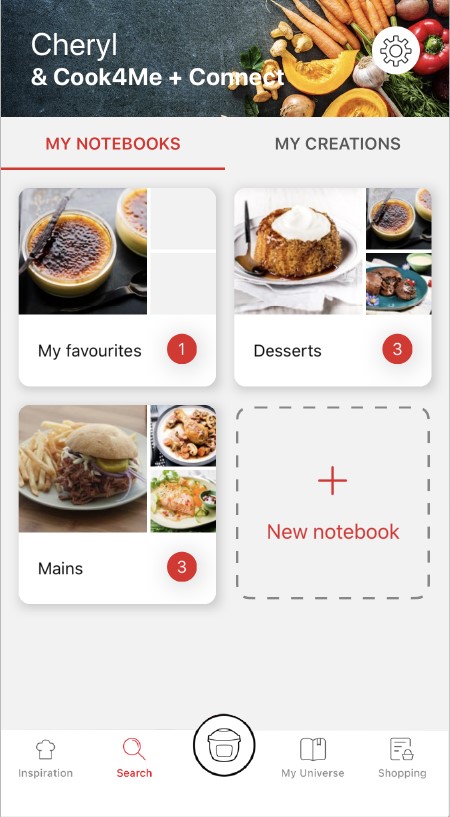
• A "My Notebooks" tab appears: select the "My Favorites" location.
• The recipe has been added.
You need to create an account and sign in to the application in order to access this feature.
Click the sharing logo to view the sharing options.
highlighting the sharing functionality in the Companion app
You can then choose how you would like to share this recipe.
The application has rich content and requires a stable Wi-Fi connection to download correctly.
If your application does not download correctly, delete it and try to download again when you have a more stable Wi-Fi connection.
During initial installation, the download may take several minutes while the application saves all the photos on your Smartphone or tablet.
Your application uses notifications to alert you at the end of cooking times using a beep.
If you want to turn off this signal, simply deactivate it in your tablet or Smartphone.
You may also disable sounds in the parameter settings for notifications on your telephone or tablet.
Your application uses notifications to alert you when your cooking is finished but also to let you know when new content (information, recipe...) is available.
If you wish, you can disable them from your smartphone settings.
You can choose not to accept cookies.
However, the grey cookies banner will remain on your screen as long as you do not click on "accept".
Cookies are used for audience measurement and personalization to help us improve your use of the product.

Audience measurement solutions allow us to analyze traffic, trends, usage and identify malfunctions in order to improve your experience.

Personalization solutions allow us to improve the quality of the information and services we provide and make your experience more enjoyable.

You can accept or deny the use of cookies when you first launch your device.
You must create an account and log in to your app to access these features.

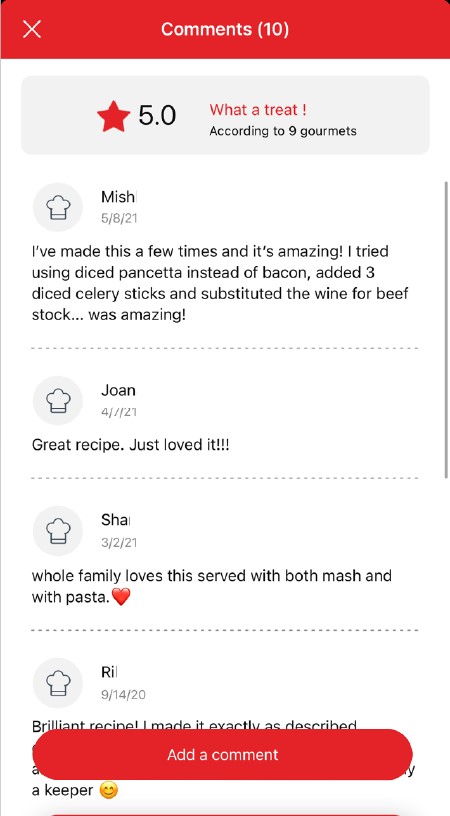
Once logged into your account, you will be able to rate the recipe and add a comment by following the instructions that appear on the screen after clicking on the notes/comments space.
highlighting rating feature from comments page in the Companion apprating page in the Companion app
When using the search function, select "Filter recipes".
In the "Recipes" section, select "Community" only.
You will then be able to see the recipes from the community.
recipe filters page in the Companion app
Once you have completed your search, specific filters make it easier for you to find the recipes that meet your needs.

The customizable filter:
• Click on "Filter" in order to sort the recipes according to the type of dish (starter, main course, dessert), the time it takes to make the recipe, the minimum rating, their themes (or packs)...
• You can also choose to select only the recipes of the brand or the recipes proposed by the community.

Sorting recipes:
Once you have made a search, you can sort your recipes by popularity, rating, age or alphabetical order.
You must create an account and log in to your app to access these features.

Once logged in, you will be able to read the comments and see the notes that community members have given to the recipe by clicking on the notes/comments area.
highlighting rating & comments feature from recipe page in the Companion appcomments page in the Companion app
You must create an account and log in to your app to access this feature.

• Choose the "My Universe" tab in the navigation bar.
• There, you will find your recipe booklets and can create new ones by clicking on "New booklet".
recipes booklets page in the Companion app
Choose the "My Universe" tab in the navigation bar, then select the booklet you wish to modify or delete. Click on the pencil at the top right of the screen, then select the action you are looking for ("Delete booklet", "Rename booklet" or "Delete recipes").
It is important to select your product in the app in order to find the right recipes for that product. This way, the app will suggest hundreds of ideal recipes.
It will also let you add your accessories and access the associated recipes.
• In "My universe", select "My profile".
• Click on the image of the registered product.
• Click on "Remove the product". The app will then ask you to select a product.
您的產品並無待機模式。 如要在烹煮過程中隨時停止程序,請按住開始/停止按鈕 3 秒。
如果您不打算在接下來的一小時內使用裝置,只需拔下插頭即可。


  • 旋轉旋鈕: 您可以使用旋轉旋鈕,從一個程序切換到另一個程序,並短按啟動/停止按鈕啟動程序。

  • 如要在烹煮過程中隨時停止程序,您只需按住開始/停止按鈕 3 秒。

  • 如要調整程序的溫度或時間,請先轉動旋轉旋鈕以選擇程序,然後按下溫度計或定時器按鈕調整設定。 向右旋轉旋鈕,會增加烹煮時間或溫度;向左旋轉旋鈕則會減少 (如果螢幕上顯示「自動」,則表示程序的溫度或時間已經改變,因此無法調節)。 當溫度和時間調整到您想要的程度時,您可以按開始/停止按鈕,以啟動烹煮程序。

  • 如要啟動延遲啟動,請轉動旋轉旋鈕以選擇程序,並根據需要來調整溫度和時間,再按下面板右上角的小時鐘按鈕,以設定延遲啟動。 橙色小燈亮起,即表示延遲啟動已開啟。 轉動旋轉旋鈕,以調整延遲啟動持續時間,然後再按下開始/停止按鈕,以啟動烹煮程序。 延遲開始時間結束後,烹煮階段即會開始。
擦拭煮食鍋的底部。
確保鍋子下方或加熱板沒有食物或液體殘留物。

然後將鍋子放入裝置中。

切勿在沒有煮食鍋的情況下使用裝置。

注意: 首次使用產品時,鍋子可能會發出輕微的氣味。 這是正常現象。
如果要使用 Turbo Crisp 封蓋,請按照以下步驟操作:
1. 將 Turbo Crisp 封蓋插入牆上插座。
2. 將材料放入鍋中。
3. 將 Turbo Crisp 封蓋放在鍋上。
4. 如要開始烹調,請選擇自動烹調模式或選擇手動模式。
有 4 種自動烹調模式可讓您選擇:
• 焙燒
• 燒烤
• 氣炸
• 烘焙

想要用到這些功能,請按下 [選單] 按鈕,直至找到您所需的烹調模式。
之後,您需要再按下 [開始] 按鈕來確認烹調模式,方可開始烹調。
選擇「手動」模式時,您可以調整溫度和烹調時間:
1. 按下 [時間/溫度] 圖示以調節溫度,然後使用螢幕上的 [+] 和 [-] 按鈕。 溫度範圍為 70 至 200°C。
2. 然後按下 [時間/溫度] 圖至以設定烹調時間,再使用螢幕上的 [+] 和 [-] 按鈕調整時間。 烹調時間範圍為 0 至 60 分鐘。
3. 按下 【開始】 按鈕以開始烹調。 剩餘烹調時間會在螢幕上顯示。
並非所有烹調模式或所有準備工作都可以使用此功能。
這原意是為了防止細菌滋生,繼而對您健康不利。
• 鍋子的裝料高度不得超過最大液位。
• 對於在烹煮期間可能會膨脹的食物 (大米、種子、扁豆、豌豆等),放入材料時的高度請勿超過其最大容量的一半。
• 鍋子必須至少要有 200 毫升的液體。

! 請勿將手靠近蒸汽排放口!
烹煮期間可能會有少量蒸汽從裝置背面逸出。
• 所需水量因食譜和烹煮時間而異。
• 必須要放有至少 200 毫升的液體。
• 將蒸籃放入鍋中,確保食物不會接觸到封蓋。

! 請勿將手靠近蒸汽排放口!
解壓階段可能會有少量蒸汽從裝置背面逸出。
食材份量不應超過最高水平。 以傳統方式烹煮時,封蓋必須一直打開。
請勿使用電器。為避免發生危險,請將電器送返任何經批准的維修中心。
• 請檢查矽膠墊片已正確放置。
• 檢查封蓋是否處於正確的關閉位置 (對齊小箭頭並順時針鎖定封蓋)。
• 檢查鍋和加熱板之間是否有異物。 取出鍋子,然後檢查加熱板、中央元件和鍋底面是否乾淨。 此外,還要檢驗中央元件是否可以自由移動。
• 鍋可能會變形 (受到撞擊、掉落...)。 必須在授權的服務中心更換鍋。
• 這是正常現象;使用幾次之後,氣味便會完全消失。
• 想要快速去除異味的話,您可以在煮食鍋中放入 0.5 升水、一杯白醋和兩片檸檬,然後啟動蒸汽程序 10 分鐘。
• 在重新使用裝置前,請務必先徹底清潔指示中所列的物品: 烹調容器、金屬蓋。
• 請檢查並非處於煮食狀態。
• 按下「壓力釋放」按鈕,以檢查壓力已完全釋放。
• 拔下產品電源,並等待其完全冷卻。
確保電源線已連接到您的裝置和主電源。
如果問題仍然持續,請將裝置送到授權服務中心。
• 封蓋的矽膠墊片位置不正確。 在這種情況下,請先讓裝置完全冷卻,才再檢查矽膠墊片位置;必要時請妥當更換。
• 安全閥和壓力釋放閥可能堵塞,或位置不正確。 在這種情況下,請先讓裝置完全冷卻,才再檢查閥門位置並確保閥門清潔;最後請將之妥當更換。
• 如果在檢查後問題仍然持續,請將產品送到認可的服務中心。
如顯示錯誤代碼 (例如: E0, E1, E2),您可以參考產品手冊了解更多資訊。
按使用手冊檢查所有零件是否已牢固放置 (矽膠墊片、安全閥和壓力釋放閥)。
封蓋位置不正確。 根據所選的烹煮程序,封蓋需要完全鎖定、關閉但未鎖定,或完全打開。 請參閱使用手冊,檢查哪個封蓋位置適合每個烹煮程序。
1. 請確保電源線已連接到電源。
2. 如果產品已連接電源,請拔下電源線 10 - 15 秒,然後重新插入。

如問題仍然持續,請聯絡我們的客戶服務或將裝置送到認可的服務中心。
由於烤架以不銹鋼製成,因此可以放在洗碗機中清洗,且並無風險。
適合,烤架與 Extra Crisp 和 Turbo Crisp 配件的所有烹調模式相容。
您可以用以下方式將烤架放入鍋子:
• 放在較低位置以升高食物,促進空氣循環。
• 放在較高位置,當中有兩個煮食高度:一個在鍋子底部,一個在烤架上。

烤架適用於多功能炊具的所有內置烹調模式,包括壓力烹煮。
本烤架可與 5.8 升或以上的多功能炊具配合使用 (相容型號清單)。
應用程式有專門介紹使用二合一烤架配件煮食的食譜。 您可以根據配件來篩選搜尋。
您亦可以無顧慮地使用烤架親自烹煮食物。
烤架最多可承受 1.2 公斤的重量。
將食材放入鍋子之前,必須先將烤架安裝到鍋子。
如您要在鍋子以外使用網梧,食物可能無法妥當放在烤架上。
建議您在處理烤架之前先讓其冷卻,或使用隔熱墊將其從鍋中取出。
如果烤架仍然很熱,請將其放在耐熱表面上。
烹煮完畢之後,請清掉已在烤架上煮熟的食材。
然後,您便可以使用隔熱墊將燙熱的烤架從鍋子中取出。
不,烤架並不適合微波加熱。
烤架僅適用於容量為 5.8 升或以上的多功能炊具。
家電中含有可回收或可循環再用的材料。請將家電放置在公共垃圾收集點。
請瀏覽網站的「配件」頁面,輕鬆找尋所需產品。
請在此網站的保修部分找到更多詳細的資訊。
如認為有零件缺漏,請致電消費者服務中心,我們將協助您覓得合適的解決方案。